

Creating events
The + Event button at the top-right of the timeline workspace
opens the quick-create dialog. The form is designed for fast capture
— three required fields up top, two collapsible expanders for the
rest.
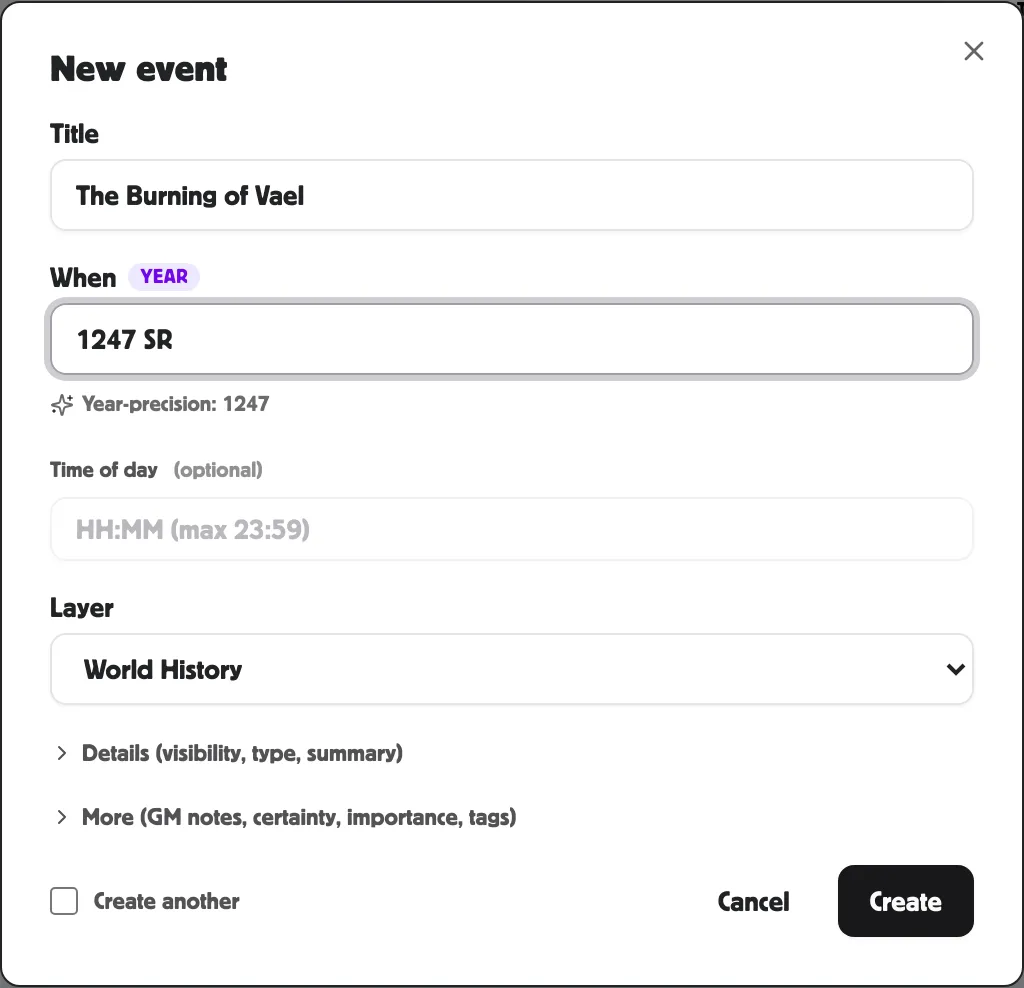
The three required fields
Section titled “The three required fields”-
Title — what the event was. Keep it concrete: King Aldren signs the Treaty of Three Crowns, not Treaty signing.
-
When — the date or anchor. The smart When field handles many formats:
You type PostRoll reads it as 2026-04-04ISO date, day precision 1247 SRyear + era short name, year precision 1247bare year, year precision 12 Brightember 1247day + month + year, day precision Brightember 1247month + year, month precision Session 8session reference, session precision soon/someday/eventuallya floating date ?/unknownan unknown date empty an unknown date (saved as undated) A chip beside the input shows the precision it detected; a sentence below describes what it read.
-
Layer — which track the event lives on. Defaults to World History. The five built-ins are World History, Sessions, Prophecy, Rumours & Myths, Agenda.
That’s enough to save. Click Create and the event lands on the canvas.
Details (collapsible)
Section titled “Details (collapsible)”Click ▶ Details to reveal:
- Type — one of 27 event types (battle, treaty, prophecy, faction move, etc.). Defaults to Custom.
- Visibility — World (default), GM only, Specific players, Public, or Unlisted. See Visibility & reveal.
- Summary — the one-line description shown to anyone who can see the world. Appears on every card on every view.
More (collapsible)
Section titled “More (collapsible)”Click ▶ More to reveal:
- Certainty — Fact (default), Rumour, Myth, False, Disputed, Unknown, or Prophecy. Changes how the card looks.
- Importance — a number from 0 to 5. Higher importance gets bigger pills and visible titles on the horizontal Timeline.
- Tags — comma-separated. Useful for cross-cutting categories like #war, #dynasty.
- GM notes — for editors only, never shown to players. See Visibility & reveal.
Create another
Section titled “Create another”The Create another checkbox at the bottom-left keeps the dialog open after Save. The Title field clears; the When field stays. Useful for batch imports — type a When once, then run through a list of titles.
Editing later
Section titled “Editing later”The dialog only handles creation. To edit an event, click it on the canvas — the Inspector opens in the right rail with every field editable. The Inspector also has fields the dialog doesn’t: Player summary, Public summary, Body, Reveal status, Display override, a source link, which session the event was discovered in, its cause/effect chain, and alternate-calendar chips.
Related
Section titled “Related”- Dating events — every precision mode in detail
- Event fields — the full set of fields, dialog and inspector combined
- Visibility & reveal