

Event fields
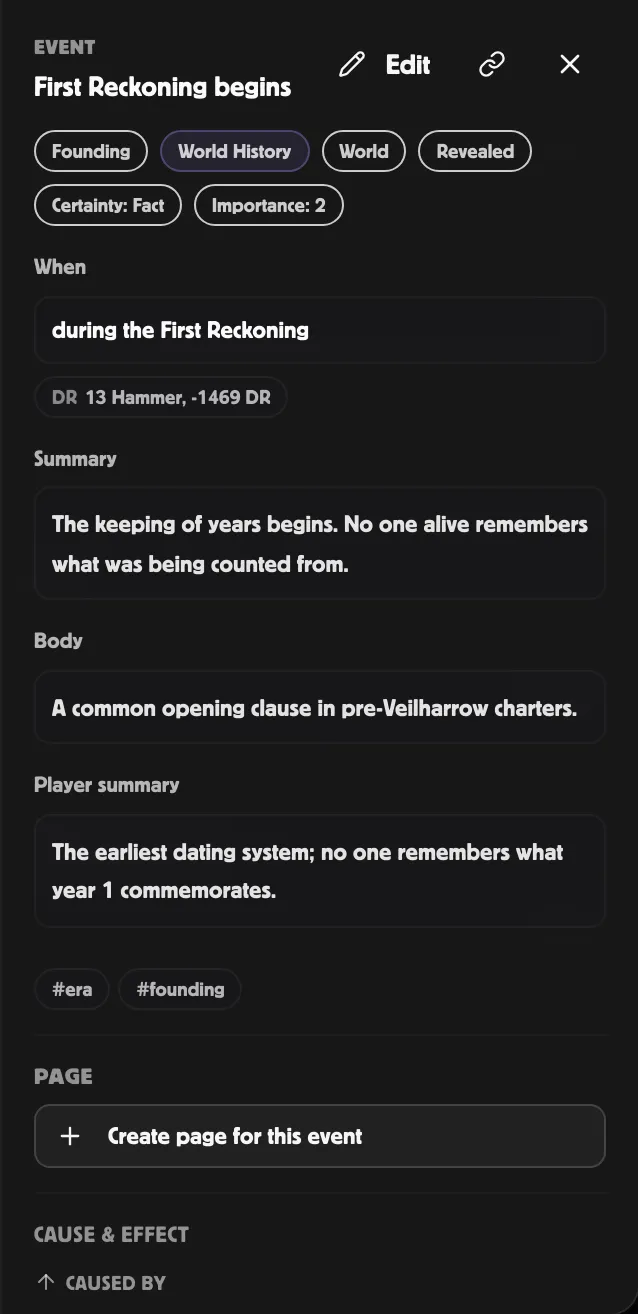
A timeline event has more fields than the create dialog surfaces. The
Inspector exposes the full set, organised by purpose.
Identity
Section titled “Identity”| Field | Notes |
|---|---|
| Title | Required. Short and concrete. |
| Type | One of 27 event types — birth, death, founding, dissolution, battle, treaty, alliance, rivalry, discovery, creation, milestone, travel, downtime, festival, disaster, session, artifact_change, relationship_change, prophecy, rumour, clue, quest_started, quest_completed, faction_move, betrayal, cycle_phase, custom. Drives the type chip in views. Pick custom if none fit. |
| Layer | The track it lives on. Five built-ins (World History, Sessions, Prophecy, Rumours & Myths, Agenda) plus any custom layers. |
| Tags | Free-text, comma-separated. Usable as a filter chip in the left rail. |
See Dating events for the precision modes. The Inspector’s When section adapts to the selected precision:
- day / month / year / era — calendar / year / month / day inputs.
- range — start and end inputs.
- relative — anchor event picker + offset in days.
- session — session picker.
- unknown / floating — no date inputs, just the Display override field.
You can override what gets shown to readers via the Display override field — useful for things like “before the Shattering” on an event with an unknown date.
Content
Section titled “Content”| Field | Notes |
|---|---|
| Summary | Short, world-visible. Renders on every card on every view. |
| Body | Long-form. The Chronicle and the Inspector show this; cards on the canvas don’t. |
| Player summary | Short, player-safe. When set, it replaces the summary on player-facing surfaces (Chronicle player-safe mode, player-safe Markdown export). |
| GM notes | 🔒 Editor-only — never shown to players. Use for behind-the-scenes context. |
| Public summary | Optional override for events on a public world. Falls back to the summary. |
| Source URL | Optional link to a real-world source (e.g. a wiki or a player’s blog post). Renders as ↗ source link on cards. |
Styling and importance
Section titled “Styling and importance”| Field | Notes |
|---|---|
| Certainty | One of 7 — fact (default, solid border), rumour / myth / disputed (dashed), false (strikethrough), unknown (faded), prophecy (amber glow). |
| Importance | 0–5. Higher importance = bigger pill on the canvas; importance 4–5 events show their titles inline. Reserve 4–5 for arc-defining moments. |
Visibility and reveal
Section titled “Visibility and reveal”See Visibility & reveal for the full model.
| Field | Notes |
|---|---|
| Visibility | GM only / World (default) / Specific players / Public / Unlisted. Controls who can see the event. |
| Reveal status | Hidden / Foreshadowed / Partially revealed / Revealed (default). Controls how it appears in the Chronicle. |
| Discovered in session | The session where the event was revealed to players. The Reveal-in-session button sets this in one click. |
Linked targets
Section titled “Linked targets”The Inspector’s Linked targets section (when wired) lets you attach the event to wiki pages, entities, actors, scenes, sessions, boards, cards, the world itself, or other events. See Linking events.
The cause/effect chain (a special case of linking) renders as a separate Cause & effect subsection in the Inspector — see Cause & effect.