

The Cycles tab
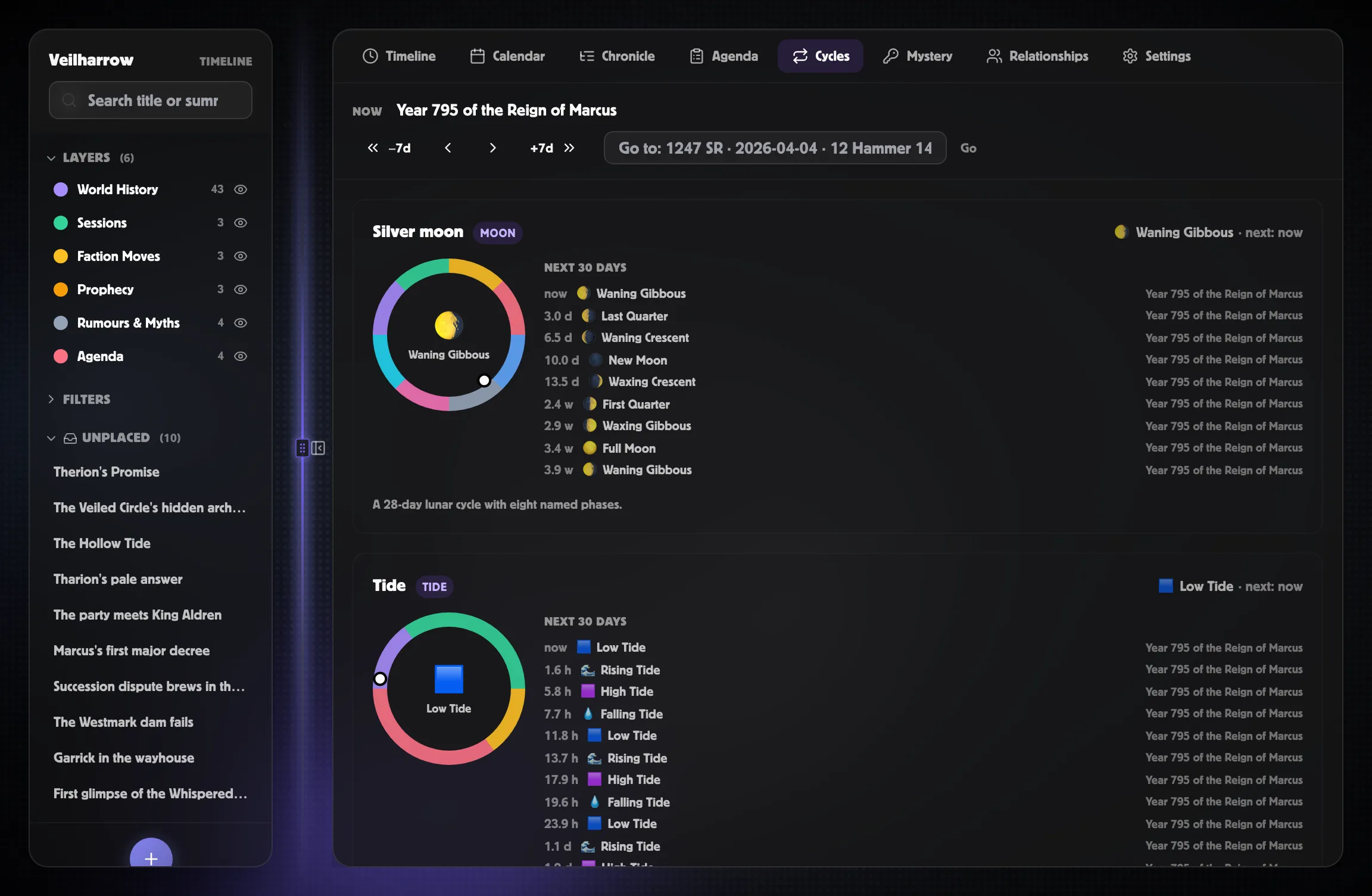
The Cycles tab is your world’s “weather report” — what phase the
moon is in, whether the tide is rising or falling, what season it is,
which festivals are active. One card per cycle, with a phase ring and
a “next 30 days” preview.
What you see
Section titled “What you see”At the top, the Now header shows the calendar’s current date in your primary calendar’s display format. Each cycle card below includes:
- A phase ring — a ring with one segment per phase in the cycle’s colours. The current phase’s icon and name sit in the centre; a small dot on the rim shows where you are inside the current phase.
- The current phase chip in the card header, with the time until the next phase.
- A next 30 days strip — every phase change in the next month, one row per transition, with the calendar date when each starts and the time-from-now.
The date scrubber
Section titled “The date scrubber”Below the Now header, the date scrubber lets you preview the world state at any past or future moment.
- −7d / ← / → / +7d buttons step the date.
- The Go to input takes the same smart format as the event
create dialog:
1247 SR,2026-04-04,12 Hammer 1492. Press Enter or click Go. - When you’ve scrubbed away from “now”, the header changes from Now to Showing and a Reset to now button appears.
Scrubbing recomputes every phase ring, every “next 30 days” strip, and every Calendar phase chip — so you can answer “what does the moon look like during the Festival of Lanterns?” without changing your campaign’s actual current date.
Empty state
Section titled “Empty state”If you have no cycles defined yet, the dashboard shows an empty state pointing you to Settings → Cycles → +. The four templates (Standard Moon / Twice-Daily Tide / Four Seasons / 12-Month Festival Ring) cover the common cases.
Cycles set to GM only are hidden from viewers who can’t edit — keep secret cycles like a hidden curse cycle invisible to players sharing your world.
Related
Section titled “Related”- Cycles overview — what cycles are conceptually
- Building a cycle — the editor walkthrough
- Cycle templates — Moon / Tide / Seasons / Festivals
- Anchoring cycles to real events — “I want a full moon on Lanternfall”