

The Calendar tab
The Calendar tab renders your events on a real calendar grid —
yours, not the Gregorian one. Custom weekday counts, intercalary feast
days, era boundaries, leap years, and cycle phases all show up where
they should.
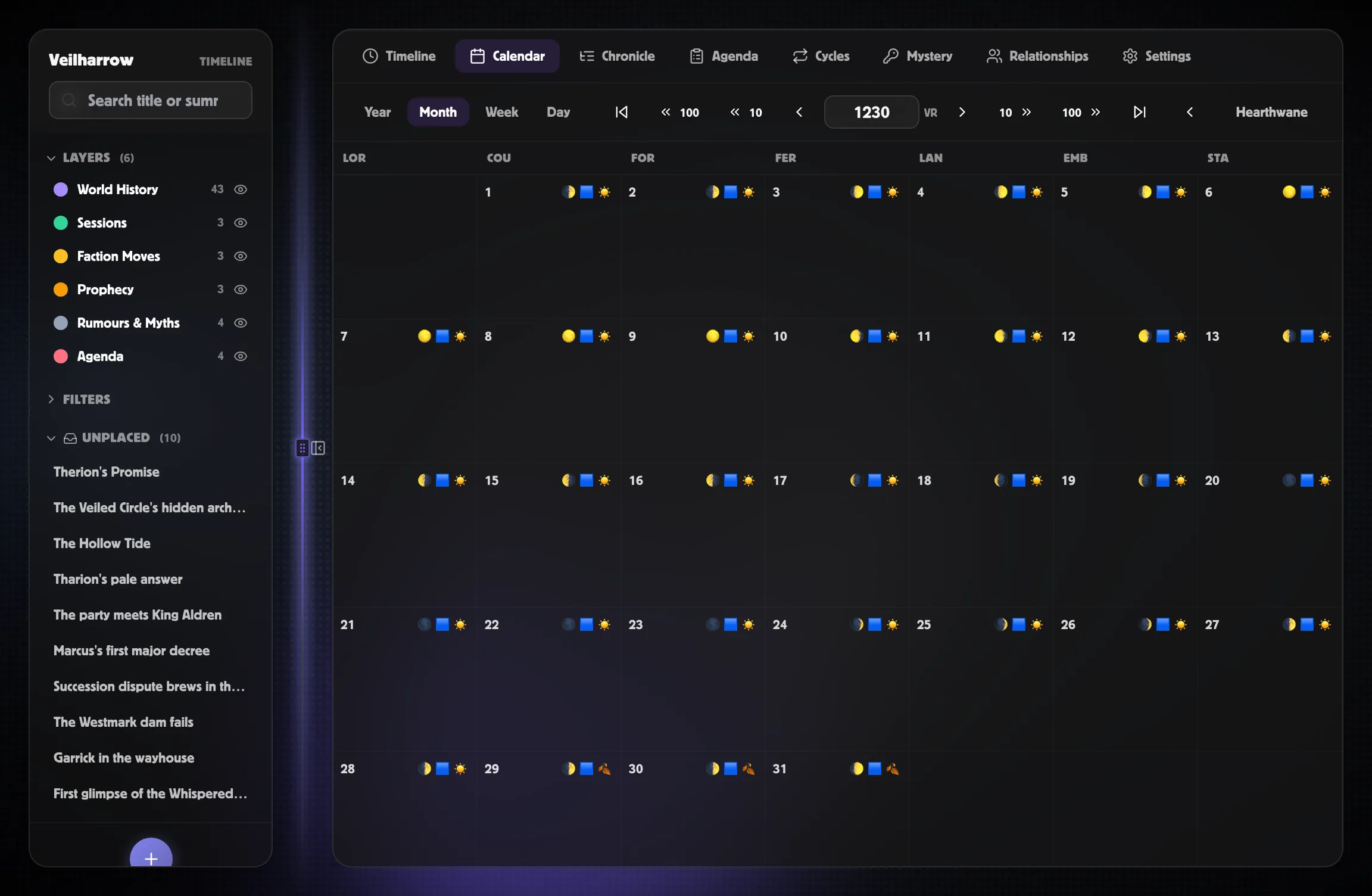
Year, Month, Week, Day sub-tabs
Section titled “Year, Month, Week, Day sub-tabs”The Calendar tab has four sub-views.
- Year — one band per month with a density bar showing event positions across the month. Click a month band to drill into the Month grid for that month.
- Month — a full grid: weekday header row, day cells, intercalary
days as full-width strips between months when applicable. Each day
cell shows up to three event dots (with a
+Nbadge for more) and up to three cycle-phase emojis in the corner. - Week — N columns (one per calendar weekday — 7 for most calendars, but custom weekday lists are honoured). Click a day to drill into Day; click an event chip to open the inspector.
- Day — single-day column with one row per hour and an “All-day”
stripe for events without a
cal_hour. Hour rows are derived from the calendar’shours_per_day(so a 30-hour fictional day works too). Use the prev / next arrows to step day-by-day; the navigation wraps month boundaries.
Use the ← / → arrows beside the year and month displays to step through time. There are also ⏮ / ⏭ “jump to previous / next event” buttons that skip to the closest year (or month, in Month view) that actually contains events — useful when scrubbing past empty stretches.
What you see in a day cell
Section titled “What you see in a day cell”- The day number in the top-left.
- Cycle phase chips in the top-right — emojis for whichever cycles are active that day (moon phase, tide phase, season). Hover for the cycle’s name and phase name.
- Event dots along the bottom, coloured by their layer.
- A
+Nbadge if more events fall on this day than fit.
Click a day to open the Day drawer — a right-rail panel that lists every event on that day plus the world-state summary for it. Click an event in the drawer to switch to the inspector.
Switching the display calendar
Section titled “Switching the display calendar”The Display dropdown in the top-right swaps which calendar the
grid uses. Switching from Harptos to Gregorian doesn’t move events —
it just re-renders them at the equivalent date in the chosen
calendar. An event authored as 12 Brightember 1247 SR will show
up at its corresponding Gregorian date when you switch.
The picker only shows calendars defined in your world; the implicit Gregorian fallback isn’t selectable here. If you only have one calendar, the picker is hidden.
Intercalary days
Section titled “Intercalary days”Calendars like Harptos have feast days that fall outside the normal weekday cycle (Midwinter, Greengrass, Shieldmeet, etc.). They render as full-width amber strips between the day they “follow” and the next day.
Click an intercalary strip to open the Day drawer for that festival. Events authored against an intercalary day show up in the strip’s event list.
Leap-year intercalaries (like Shieldmeet, which only appears every fourth year in Harptos) automatically hide on non-leap years.
When events from a different calendar show up
Section titled “When events from a different calendar show up”If you author an event in Harptos but switch the display to Gregorian (or vice-versa), PostRoll projects the event’s canonical instant onto the displayed calendar. The event lands on whatever Gregorian date matches.
Related
Section titled “Related”- Building a calendar
- Calendar cookbook — Harptos with Shieldmeet, regnal, Four Seasons
- Multiple calendars — alt-date chips, primary calendar
- Cycles overview — what produces those phase chips