

The Mystery tab
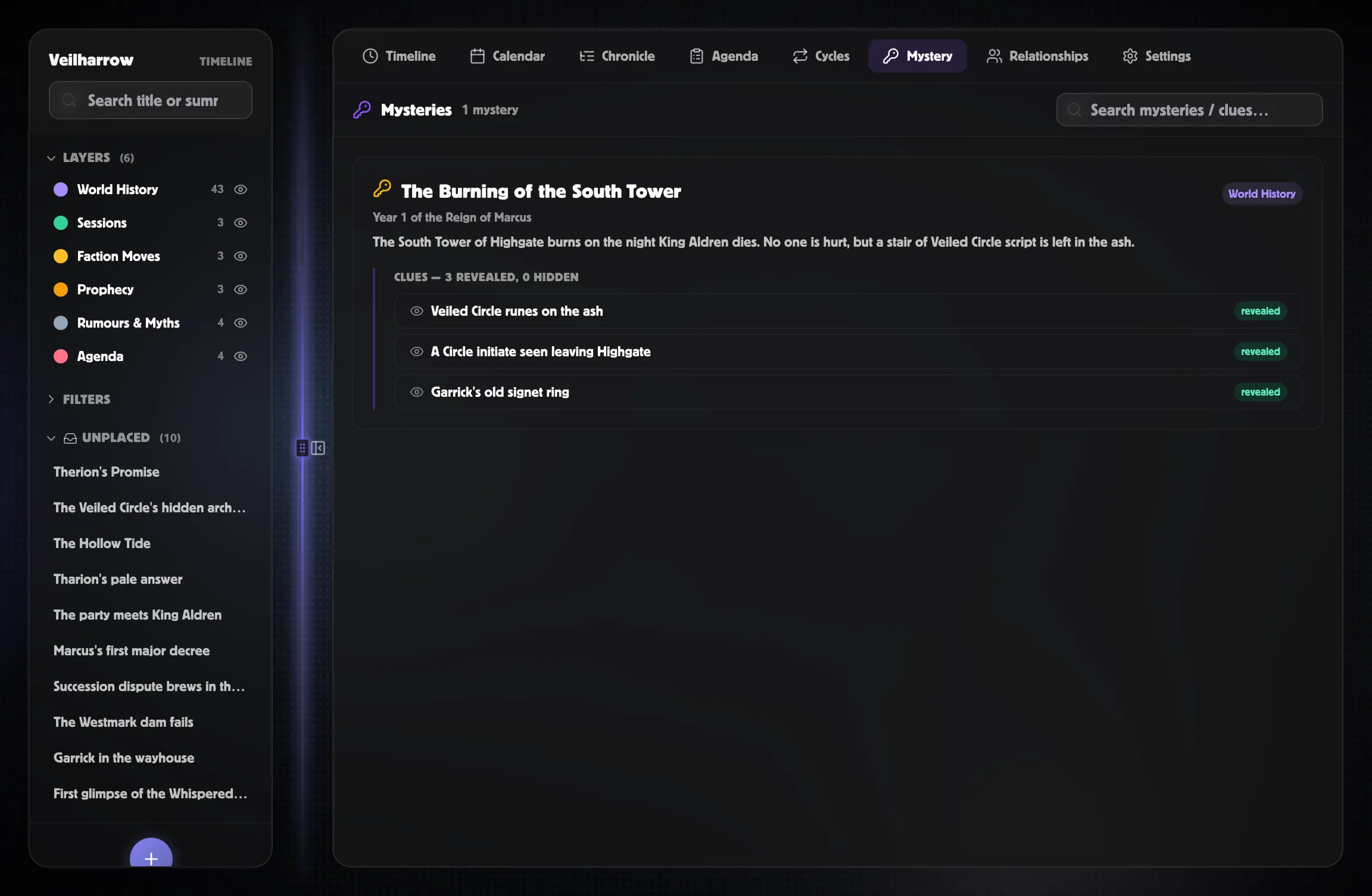
The Mystery tab is a clue-board surface: pick any event and link
clues to it, and that event becomes the “mystery” with its clue
cluster beneath. Hidden clues render as redacted placeholders so you
can preview the player view without spoiling it.
How a mystery is made
Section titled “How a mystery is made”Any event becomes a mystery the moment another event links to it as a clue (a clue for link).
- The target event (the thing being explained / pointed at) is the mystery.
- The source events (the clues) cluster beneath it.
There’s no separate “this is a mystery” flag — any event that has at least one incoming clue link shows up here.
What you see per mystery
Section titled “What you see per mystery”A mystery card shows:
- The mystery event’s title, date, layer chip, and summary.
- A clue count — N revealed, M hidden.
- The list of clues, ordered along the timeline when their dates are known.
- Clues set to Hidden or Foreshadowed appear as
(hidden clue)placeholders for players — but show their full title to GMs.
Click the mystery title to open it in the inspector. Click a clue
title (when revealed) to open that one. Click a (hidden clue)
placeholder as a GM to reveal it.
Authoring clue links
Section titled “Authoring clue links”You can link clues in two places:
- From an event’s inspector — open any event and find the
Clues section (just below Cause & effect):
- Mark as clue for… makes this event a clue pointing at a mystery — pick the mystery it explains.
- Add clue… treats this event as the mystery and attaches an existing event as one of its clues.
- From the Mystery tab — click + Add clue on any mystery card and pick the event that acts as a clue.
Either way, the mystery and its clues appear — and update live — on this tab.
Hidden clue rendering
Section titled “Hidden clue rendering”When a clue’s reveal status isn’t Revealed, GMs still see it
normally on this view — but it shows as a (hidden clue) placeholder
when the GM toggles into player-preview mode (or for an actual player
you’ve shared the world with).
Use Foreshadowed for clues you’ve planted in early sessions but haven’t surfaced yet. Use Partially revealed for “they have a hint but not the full picture” — the clue’s Player summary stands in for the full body in that case.
Related
Section titled “Related”- Linking events — every link relationship type
- Cause & effect — the related chain workflow
- Visibility & reveal — how hidden and foreshadowed states appear