

Event comments
Every event in the inspector has a Comments section below the
cause-effect chain. Comments are free-text, support markdown, and
are the place to capture the conversational layer of campaign
planning that isn’t quite “lore” and shouldn’t go in the GM notes.
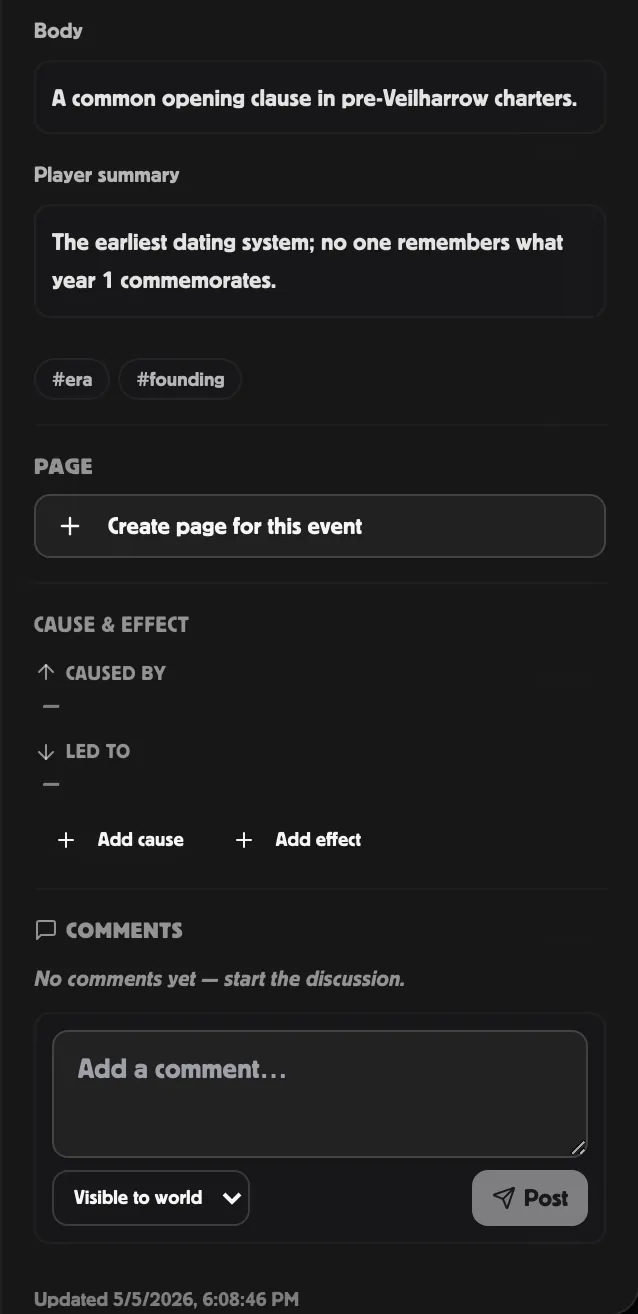
When to use a comment vs GM notes
Section titled “When to use a comment vs GM notes”The GM notes are the definitive GM-side record of an event — what “actually happened” from the GM’s perspective.
Comments are for the commentary around it: should this NPC show up here? Did we already foreshadow this in session 4? Player Y asked me a sharp question about this last night, here’s how I want to handle it next time.
Two GMs co-running a campaign have a much easier time with comments than via Discord because the discussion lives next to the event it’s about.
Visibility
Section titled “Visibility”Each comment has a visibility:
- Visible to world (default) — anyone with world access (editors, viewers, and public-link readers, as long as the event itself isn’t GM only) can read it.
- GM only — editors / world owner only. Shows with an amber border so you know at a glance which threads are private.
Editors can post either kind. Viewers can only post world-visible comments.
You can change a comment’s visibility after posting via the inline Edit button.
Editing and deleting
Section titled “Editing and deleting”- Authors can edit / delete their own comments at any time. The edited timestamp shows alongside the original date.
- World editors can delete any comment (handy when a viewer posts spam). Editors can NOT edit other people’s comments — only delete.
- Deleting a comment hides it but keeps a copy behind the scenes. There’s no “trash” view in the app today, but a deleted comment can still be recovered if needed.
Markdown
Section titled “Markdown”Comment bodies render through the same MarkdownLite renderer the
inspector uses for event body / GM notes. Supports:
**bold**,*italic*,~~strikethrough~~# heading,## heading(downscaled — comments aren’t documents)- Bulleted and numbered lists
inline code, code blocks> blockquotes[link](https://…)(opens in a new tab)
Threading
Section titled “Threading”Threaded replies aren’t available yet — comments show flat, sorted by when they were posted. To reply, write a new comment that references the previous one by quoting or @-mentioning (there’s no @-name autocomplete yet).
Reply UI is on the polish list.
Live updates
Section titled “Live updates”If two GMs have the same event open in different browsers, posting a comment in one shows up for the other almost instantly — no refresh needed.
Related
Section titled “Related”- Visibility & reveal — what GM only vs World mean elsewhere
- Event fields — the canonical fields that aren’t in comments